
South Carolina Paycheck Calculator 2026
Estimate South Carolina take-home pay from annual salary or hourly wages after federal income tax, Social Security, Medicare, South Carolina withholding, overtime, retirement, benefits, extra withholding, and other payroll deductions.
Quick Answer: How South Carolina Take-Home Pay Works
A South Carolina paycheck begins with gross earnings. Payroll may then subtract traditional retirement contributions, eligible pre-tax benefits, federal income-tax withholding, Social Security, Medicare, South Carolina withholding, extra withholding, and post-tax deductions.
For 2026 payroll, South Carolina employers use the updated SC W-4 and withholding tables. The annualized formula gives a $5,000 reduction for each claimed allowance, provides a limited standard-deduction allowance when one or more allowances are claimed, and applies 0%, 3%, and 6% withholding tiers.
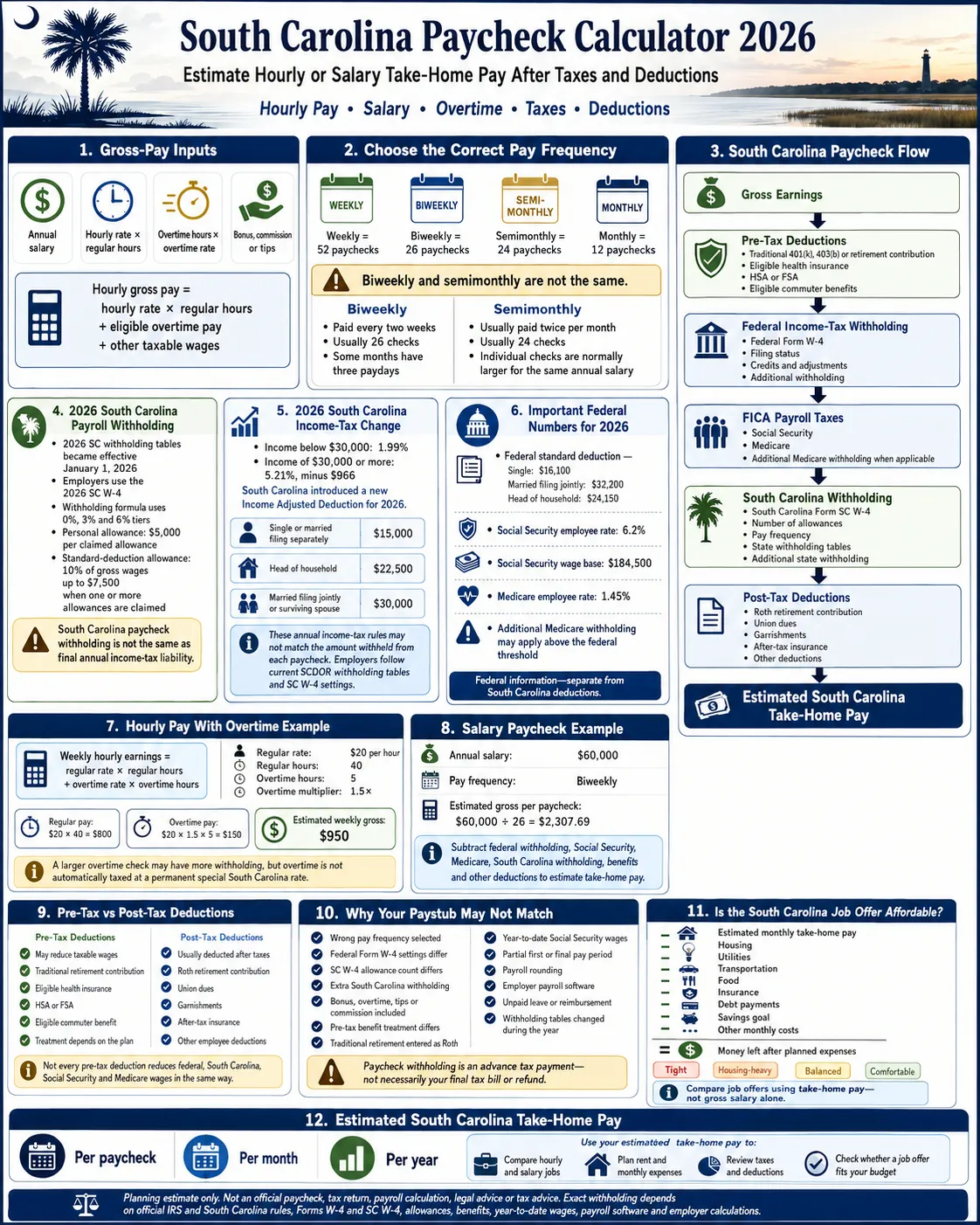
South Carolina Paycheck Calculator With Taxes and Deductions
Enter the details that match your real payroll setup. The state estimate follows the 2026 annualized South Carolina withholding formula rather than applying a guessed flat percentage.
South Carolina Tax Impact: With vs Without State Withholding
This comparison isolates the estimated South Carolina paycheck withholding. It is useful for reviewing an SC W-4, checking an exemption claim, comparing states, or understanding why two otherwise similar offers produce different checks.
| Scenario | Estimated paycheck | Estimated monthly take-home | Practical meaning |
|---|---|---|---|
| With SC withholding estimate | $0 | $0 | Uses 2026 SC allowances, standard-deduction allowance, tiers, and extra state withholding. |
| Without SC withholding estimate | $0 | $0 | Use only for a valid exempt or no-SC-withholding planning scenario. |
| Estimated SC withholding difference | $0 | $0 | Shows the state-payroll withholding impact, not a complete annual return calculation. |
Monthly South Carolina Budget From Your Paycheck
A gross salary does not show whether a job can support housing, transportation, insurance, debt, groceries, utilities, childcare, and savings. This budget snapshot turns estimated net pay into a monthly planning number.
South Carolina Job Offer and Housing Affordability Calculator
Use this second tool before accepting an offer or signing a lease. It estimates monthly take-home pay and compares it with the recurring costs that determine whether the salary feels tight, housing-heavy, balanced, or comfortable.
What Common South Carolina Paycheck Searches Actually Mean
Each search phrase represents a different practical problem. The useful answer is a calculator field, comparison, or explanation—not a repeated keyword list.
How This South Carolina Paycheck Estimate Works
The calculator annualizes regular wages, overtime, bonuses, commissions, and tips. It then estimates federal income tax, FICA, South Carolina withholding, retirement, benefits, post-tax deductions, and extra withholding.
| Paycheck item | Calculation approach | Why a paystub may differ |
|---|---|---|
| Federal income tax | 2026 federal brackets, standard deduction, entered credits, and optional federal-only deductions. | Employers use Publication 15-T, exact W-4 fields, pay-period methods, multiple-job settings, and rounding. |
| Social Security | 6.2% of estimated Social Security wages up to the $184,500 wage base. | Year-to-date wages determine when the annual wage base is reached. |
| Medicare | 1.45% of Medicare wages plus a 0.9% employee estimate above $200,000. | The employer withholding threshold can differ from final joint-return liability. |
| South Carolina withholding | Annualized SC taxable wages minus allowance and standard-deduction amounts, followed by official 0%, 3%, and 6% tiers. | SC W-4 allowances, exemption status, taxable-wage treatment, extra withholding, official tables, and rounding matter. |
| SC unemployment insurance | Shown as a $0 employee deduction. | South Carolina unemployment tax is employer-funded and may not legally be deducted from worker pay. |
| Benefits and retirement | Separated into traditional retirement, pre-tax benefits, and post-tax deductions. | A deduction may reduce federal, South Carolina, FICA, all, or none of those wage bases. |
Before You Calculate: Information to Have Ready
| Information | Where to find it | Why it matters |
|---|---|---|
| Gross salary or hourly rate | Offer letter, employment agreement, timesheet, or paystub | It is the starting point for every gross-to-net calculation. |
| Pay frequency | Payroll calendar or recent paystub | Weekly, biweekly, semimonthly, and monthly schedules divide annual withholding differently. |
| Federal Form W-4 | Employer payroll or HR portal | Filing status, credits, deductions, multiple jobs, and extra withholding affect federal tax. |
| South Carolina Form SC W-4 | Employer onboarding or SCDOR forms | Allowances, extra state withholding, and an eligible exemption claim affect SC withholding. |
| Benefit tax treatment | Benefits guide and taxable-wage lines on the paystub | Health, HSA, FSA, commuter, and retirement items can affect different tax bases. |
| Special earnings | Paystub or compensation plan | Overtime, bonus, commission, tips, retro pay, and partial periods can change withholding. |
Which Forms and Records Control a South Carolina Paycheck?
| Form or record | What it controls | When to review it |
|---|---|---|
| Federal Form W-4 | Federal income-tax withholding | New job, marriage, dependents, second job, income change, or repeated refund/balance-due problem |
| South Carolina Form SC W-4 | Allowances, filing information, additional SC withholding, and eligible exemption status | New job, personal or financial change, multiple jobs, or an incorrect state withholding amount |
| Payroll home and work location | State-source wage and withholding setup | Moving, remote work, interstate commuting, or changing work locations |
| Paystub taxable-wage lines | Federal, Social Security, Medicare, and state taxable wages | When gross pay and tax wage boxes do not match |
| Form W-2 | Year-end federal and state wage and withholding reporting | Before filing the annual federal and South Carolina returns |
Which Deductions Reduce Which Taxes?
“With deductions” does not mean subtracting one combined number. The tax effect depends on the plan and whether the item is pre-tax for federal, South Carolina, Social Security, Medicare, all, or none of them.
| Deduction | Common payroll treatment | Practical action |
|---|---|---|
| Traditional 401(k), 403(b), or retirement | Often reduces federal and South Carolina income-taxable wages but generally not Social Security or Medicare wages. | Compare federal/state taxable wages with Social Security wages. |
| Roth retirement contribution | Usually post-tax for current income-tax purposes. | Enter it as a post-tax deduction rather than traditional retirement. |
| Health, dental, or vision insurance | Often pre-tax through an eligible employer plan, but treatment can vary. | Check which taxable-wage boxes the deduction reduces. |
| HSA or FSA | Often pre-tax when contributed through a qualifying payroll arrangement. | Verify eligibility, annual limits, and FICA treatment. |
| Commuter benefit | May receive favorable payroll-tax treatment up to applicable federal limits. | Use the employer-plan amount rather than the full commuting cost. |
| Union dues or garnishment | Often deducted after taxes. | Enter the actual per-paycheck amount as post-tax. |
| Extra withholding | Reduces current take-home pay but is a tax payment rather than a benefit cost. | Enter federal and South Carolina extra withholding separately. |
| SC unemployment insurance tax | Employer-funded, not an employee payroll deduction. | Do not subtract it from take-home pay. |
South Carolina Hourly Pay With Overtime, Bonuses, Tips, and Commission
Hourly paycheck with overtime
Enter regular weekly hours, overtime hours, the applicable multiplier, and paid workweeks. The calculator adds overtime to annual gross wages before estimating withholding.
A larger overtime check can have more withholding because payroll annualizes the pay period or uses a supplemental method. That does not mean all overtime is permanently taxed at a special South Carolina rate.
Bonus, commission, and tip income
Enter expected annual extra wages in the bonus, commission, tips, or other-wages field. This provides an annual planning estimate, while the actual special-pay check may use different withholding rules.
Any federal deduction for qualified tips or overtime can be narrower than total wages and does not generally remove Social Security, Medicare, or South Carolina withholding from the paycheck.
2026 Numbers and South Carolina Withholding Rules Used Here
| 2026 item | Amount or rule | How this page uses it |
|---|---|---|
| Federal standard deduction | $16,100 single, $32,200 married filing jointly, and $24,150 head of household | Reduces estimated annual federal taxable income. |
| Federal marginal rates | 10%, 12%, 22%, 24%, 32%, 35%, and 37% | Applied progressively to estimated federal taxable income. |
| Social Security | 6.2% employee rate up to the $184,500 wage base | Caps the employee Social Security estimate. |
| Medicare | 1.45%, plus 0.9% employee withholding estimate above $200,000 | Applied to estimated Medicare wages without the regular Social Security wage cap. |
| SC personal allowance | $5,000 for each claimed allowance | Reduces annualized SC wages before the withholding tiers are applied. |
| SC standard-deduction allowance | $0 with zero allowances; otherwise 10% of gross wages, capped at $7,500 | Reduces annualized SC withholding wages when at least one allowance is claimed. |
| SC withholding tiers | 0% through $3,640; 3% from $3,640 to $18,230; 6% above $18,230 | Estimates annual SC payroll withholding before division by pay frequency. |
| SC unemployment insurance | Employer-funded; employee deduction estimate $0 | Does not reduce employee take-home pay. |
2025 vs 2026 South Carolina Paycheck Calculations
Use the calculator for the year wages are paid. A 2025 estimate should not be reused automatically for a 2026 paycheck.
| Item | 2025 reference | 2026 treatment | Why it matters |
|---|---|---|---|
| SC withholding tables | 2025 payroll tables and SC W-4 | New tables and 2026 SC W-4 effective January 1, 2026 | Allowance-based paycheck withholding can change even when salary stays the same. |
| Annual SC income-tax structure | Prior graduated annual tax structure | H. 4216 uses 1.99% below $30,000 and 5.21% minus $966 at $30,000 or more | Final annual liability can differ from payroll withholding. |
| SC annual deduction | Federal-linked standard/itemized deduction treatment | New South Carolina Income Adjusted Deduction: $15,000 single/MFS, $22,500 HOH, $30,000 joint/surviving spouse, potentially reduced by income | This applies to the annual return and is different from the payroll standard-deduction allowance. |
| Federal standard deduction — single | $15,750 | $16,100 | Using the old amount can overstate estimated federal taxable income. |
| Social Security wage base | $176,100 | $184,500 | Higher earners can pay Social Security tax on more wages in 2026. |
Biweekly vs Semimonthly Pay in South Carolina
Biweekly pay normally means 26 checks per year. Semimonthly pay normally means 24. The annual salary can be identical, but semimonthly gross pay is usually larger because it is divided by fewer checks.
Biweekly: 26 checksSemimonthly: 24 checksHourly vs Salary Paycheck
Hourly workers should enter regular and overtime hours separately. Salaried workers should enter annual base salary and add expected bonuses or commissions. Both should use the actual pay frequency and deduction amounts.
Hourly: rate × hoursSalary: annual compensationSouth Carolina Salary After Tax Examples People Commonly Search
These dynamic examples use a single federal filer, one SC allowance, biweekly pay, no retirement, and no benefit deductions. Use the main calculator for an estimate based on your actual setup.
| Common salary search | Estimated biweekly take-home | Estimated monthly take-home | What to check next |
|---|---|---|---|
| $40,000 salary after taxes in South Carolina | $0 | $0 | SC allowances, insurance, housing, transportation, and debt. |
| $60,000 salary after taxes in South Carolina | $0 | $0 | Retirement percentage, benefits, rent, and savings. |
| $75,000 salary after taxes in South Carolina | $0 | $0 | W-4 credits, extra withholding, and job-offer costs. |
| $100,000 salary after taxes in South Carolina | $0 | $0 | Bonus treatment, Medicare, retirement, and annual tax planning. |
| $150,000 salary after taxes in South Carolina | $0 | $0 | Social Security wage base, special pay, and multi-job settings. |
South Carolina Resident, Nonresident, Remote Work, and Moving Notes
Why Your Real South Carolina Paycheck May Not Match
- The wrong weekly, biweekly, semimonthly, or monthly pay frequency was selected.
- Federal Form W-4 filing status, Step 2, credits, deductions, or extra withholding differ.
- The SC W-4 allowance count, additional amount, or exemption status differs.
- Traditional retirement was entered as Roth, or a Roth contribution was entered as pre-tax.
- Health, HSA, FSA, or commuter benefits reduce different wage boxes than expected.
- The paycheck includes overtime, bonus, commission, tips, retro pay, severance, or reimbursement.
- Payroll software uses exact tables, pay date, year-to-date wages, and rounding.
- Social Security tax changed after annual cumulative wages reached the wage base.
- The first or final check covers only part of a pay period.
- An amount labeled “SUI” or unemployment should be questioned because South Carolina UI tax is employer-funded.
How to Match This Estimate With Your Real Paystub
Official Source Notes
This independent calculator summarizes official information for planning. Employers should use official withholding publications and payroll systems for compliance.
South Carolina Paycheck Calculator FAQs
How much is my paycheck after taxes in South Carolina?
Enter salary or hourly wages, pay frequency, federal filing status, South Carolina allowances, exemption status, retirement, benefits, deductions, credits, and extra withholding. The calculator estimates take-home pay per paycheck, per month, and per year.
How is South Carolina paycheck withholding calculated in 2026?
The 2026 formula annualizes South Carolina taxable wages, subtracts $5,000 for each claimed allowance, applies a standard-deduction allowance when at least one allowance is claimed, and then uses the official 0%, 3%, and 6% withholding tiers.
What are the South Carolina withholding rates for 2026?
The official payroll formula uses 0% on the first tier, 3% on the middle tier, and 6% on the upper tier. These are paycheck-withholding tiers, not a complete statement of final annual South Carolina income-tax liability.
What does South Carolina Form SC W-4 control?
Form SC W-4 records filing information, the number of South Carolina allowances, any additional state amount to withhold, and an eligible exemption claim. Federal Form W-4 separately controls federal withholding.
How do South Carolina withholding allowances affect my paycheck?
Each claimed allowance reduces annualized wages by $5,000 in the 2026 withholding formula. Claiming at least one allowance also activates a standard-deduction allowance equal to 10% of gross wages, capped at $7,500.
Can I calculate hourly pay and overtime in South Carolina?
Yes. Select hourly pay and enter the hourly rate, regular weekly hours, overtime hours, overtime multiplier, and paid workweeks. The calculator adds those wages before estimating taxes and deductions.
What is the difference between biweekly and semimonthly pay?
Biweekly pay normally means 26 paychecks per year. Semimonthly pay normally means 24. The same annual salary therefore produces a different gross amount per check.
Does a traditional 401(k) reduce South Carolina paycheck taxes?
Traditional retirement contributions can reduce federal and South Carolina income-taxable wages, but they generally do not reduce Social Security or Medicare wages. Actual payroll treatment depends on the plan.
Does this calculator include bonuses, tips, and commissions?
Yes. Enter expected annual bonus, commission, tips, or other wages in the extra-income field. The annual estimate can differ from the actual special-pay check because payroll may use supplemental-wage methods.
Why can 2026 South Carolina withholding differ from final annual tax?
Employers use the 2026 withholding tables and SC W-4 settings during payroll. H. 4216 changed the 2026 annual individual income-tax structure and created the South Carolina Income Adjusted Deduction, so final return liability may not equal paycheck withholding.
Why does ADP or my employer payroll portal show a different result?
Employer payroll can use exact W-4 and SC W-4 settings, year-to-date wages, benefit tax codes, official tables, pay dates, special earnings, and rounding. This public calculator uses planning estimates.
Should I use a 2025 or 2026 South Carolina paycheck calculator?
Use the year in which wages are paid. South Carolina issued new 2026 withholding tables and a 2026 SC W-4, while federal standard deductions, brackets, and the Social Security wage base also changed.
What if I work in South Carolina but live in another state?
South Carolina generally taxes wages earned in South Carolina. Residence, work location, another state’s rules, credits for tax paid to another state, and employer withholding setup should all be reviewed.
Can I use this calculator before accepting a South Carolina job offer?
Yes. Use the job-offer tool to compare estimated monthly take-home pay with housing, utilities, transportation, food, debt, benefits, savings, and other recurring costs.
Can this calculator replace official payroll tables or tax advice?
No. It is a planning estimate and cannot replace IRS Publication 15-T, South Carolina withholding formulas and tables, employer payroll software, tax preparation, legal advice, or professional payroll guidance.
Related Paycheck Calculators
Only the verified site homepage is linked here. Add nearby-state or topic pages after confirming their live URLs in the site’s post sitemap.
Estimate Your South Carolina Take-Home Pay Before Payday
Recalculate whenever salary, hourly schedule, overtime, SC W-4 allowances, W-4 settings, benefits, retirement, housing, or monthly costs change. Use the result before accepting a job, signing a lease, changing deductions, or planning a budget.
Run the SC Calculator Again